How the window is put together
The window is a few fixed places, and views that extensions put in them. The main area shows one thing at a time: a thread (with its panes beside it), or a space. This page names each part, what goes where, and who may put it there. For the API, see The window and The UI half.
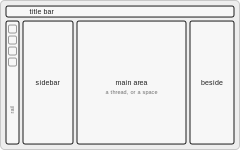
Places
A place is a part of the window that views go in. The layout decides which view goes where: each view's default,
then whatever you moved (~/.superego/layout.json, or a right-click on the view).
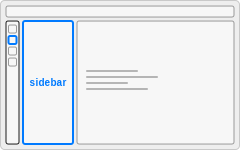
- sidebar: a button in the rail, and the sidebar while it's the open one. Threads is a sidebar, and so are Staff and Notes. Only one sidebar is open at a time; its button hides or shows the sidebar.
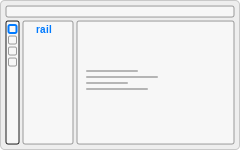
- rail: a button in the rail that isn't a sidebar (Ask Ego).
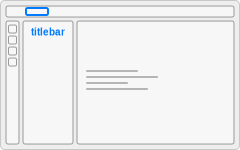
- titlebar: the start of the title bar, standing in for a sidebar when there's none (the thread picker).
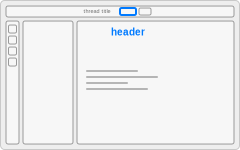
- header: right of the thread's title (its model, a chip).
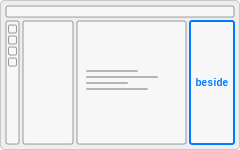
- beside: a column right of the thread (thread details, ⌘I).
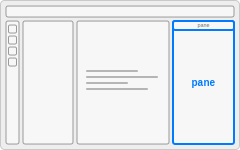
- pane: the thread's pane menu. Such a view opens as a pane (below).
sidebar, rail and titlebar are the window's places: there's one of each whatever thread is shown. header,
beside and pane are a thread's: what they show is about the thread shown, and a profile's views appear there only
in that profile's threads.
Threads and panes
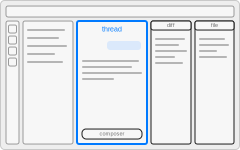
The main area usually shows a thread: its transcript and composer, and its panes in columns to its right. A pane is
opened in a thread, with params (a file, a diff, a web page); a thread can have as many as it likes, and they're kept
with it. The agent opens them too (pane_open).
Views, panes and spaces
Three ways an extension shows something. They differ in how many there are and who decides where they go.
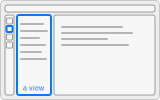
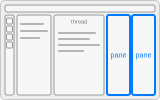
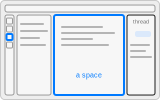
| How many | Where | Opened by | |
|---|---|---|---|
| View | one, by its id | where the layout puts it (any place it fits) | being placed: it's simply there |
| Pane | any number, each with params | beside the thread it belongs to | pane.open, the pane menu, the agent's pane_open, a file link |
| Space | any number, each with params | the main area, instead of the thread | space.open, a link its scheme claims (note:…), its sidebar's list |
A view is something like the thread list or the Staff board: there's one, and you choose where it lives. A pane or a space is something like a file or a note: you open as many as you need, and each is what its params say.
Spaces
A space fills the main area, where a thread otherwise shows: a notes page, a canvas. Back and forward go through spaces as through threads, and picking a thread in the sidebar leaves the space for it.
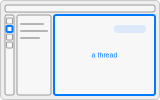
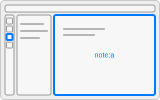
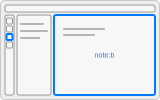
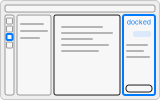
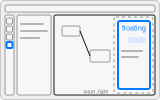
note:a from a link in it, then note:b linked from a. Back returns to a, then to the thread.Each space has its own thread, one per space (a kind with its params), which the window remembers. Until there is one, the column offers Ask about this…: sending starts a thread on the space's profile, told what you have open, and docks it. It's listed in the sidebar like any other thread; ↗ opens it as the thread, ✕ undocks it. The title bar's button shows or hides it. A space picks how its thread sits:
Sidebars and spaces together
A sidebar and a space are different places, and an app like Notes uses both: its sidebar is the list of notes, and each note it opens is a space in the main area, with a thread docked beside it.
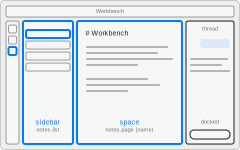
notes.list fills the sidebar; a click opens notes.page with { name }; its thread is docked on the right.So a sidebar is where you pick something, and a space is the thing you picked, filling the window. Threads work the same way: the Threads sidebar lists them, and the one you pick fills the main area.
Who may put what where
What an extension draws comes either as code (a UI half: React components) or as data (a daemon half's data view: blocks the window draws itself, so no code of the extension's runs in the window).
| Who | Window places (sidebar, rail, titlebar) | Thread places (header, beside, pane) | Spaces |
|---|---|---|---|
| The app's bundled extensions | yes | yes, in every thread | yes |
A global profile of yours (global: true) |
yes | yes, in every thread | yes |
| Any other profile of yours | data views only | yes, in its own threads | no |
| A project's profile | no | yes, in its own threads | no |
A global profile is part of the app rather than of its threads: the daemon loads it when it starts, and the window installs its UI as the app's. Notes and Canvas are global profiles. A remote machine's profile UI still asks you before its code runs in your window.
On a phone
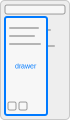
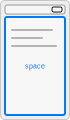
There's no rail and no title bar. The open sidebar is a drawer over the thread, with the other sidebars at its foot. A thread's title opens its sheet, holding what the title bar and the column beside would. A space fills the screen, and its thread opens as the thread.

Words
- Place: a part of the window views go in:
sidebar,rail,titlebar,drawer(the window's);header,beside,pane(a thread's). - View: something an extension draws, by id, that the layout puts in places.
- Layout: where each view goes: views' defaults, then your changes (
layout.json). - Sidebar: a rail button and the panel it opens beside the main area.
- Pane: a column beside a thread, opened in it with params.
- Space: a view that fills the main area, opened with params, with a thread of its own.
- Slot: a spot inside another part (above the composer, after a thread's title in the sidebar) that extensions add to, in order; not moved by the layout.
- UI half / daemon half: an extension's code for the window, and for its machine.
- Data view: a view drawn from blocks a daemon half sends, with no code in the window.
- Global profile: one of your profiles that's part of the app, not only of its threads.